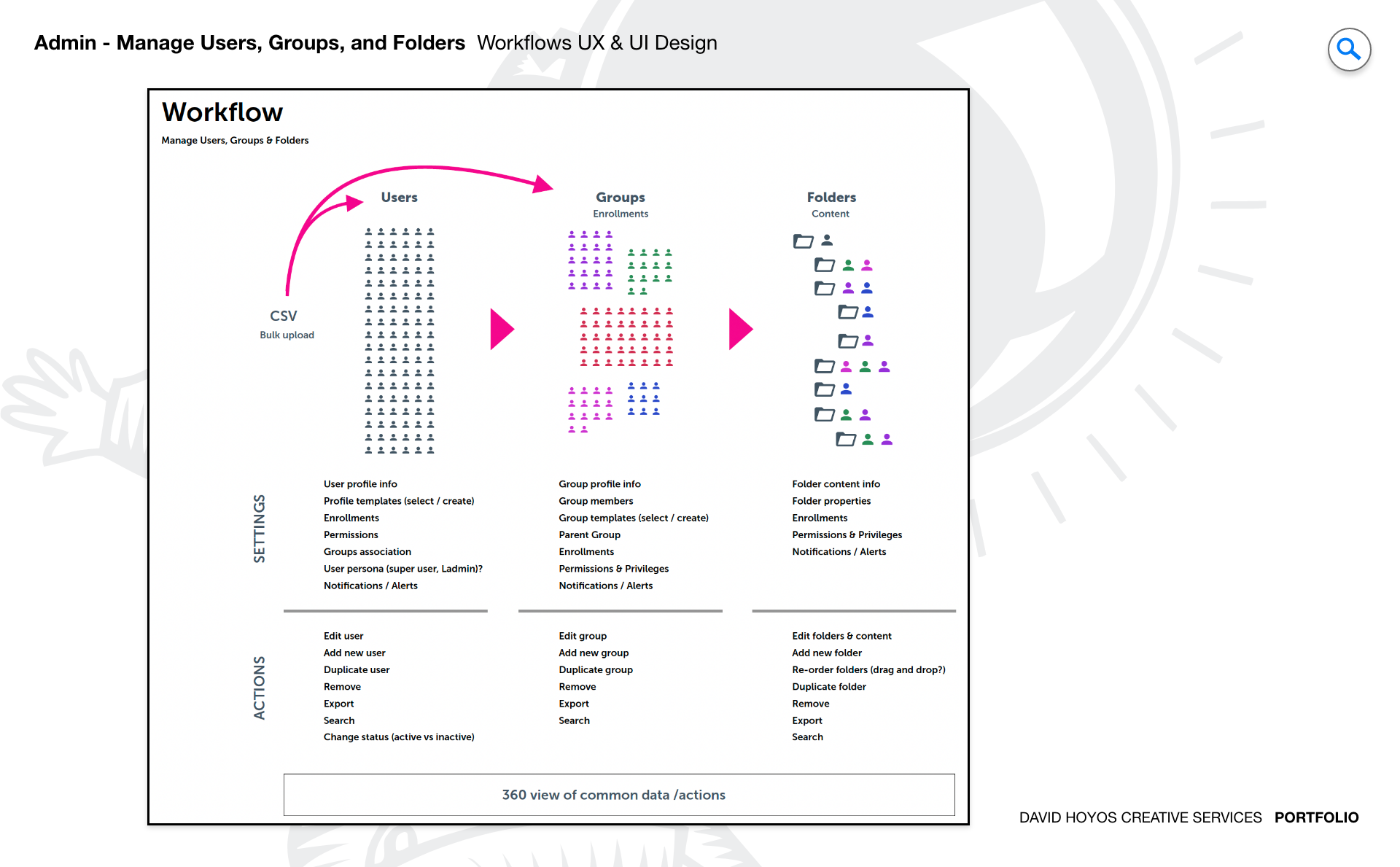
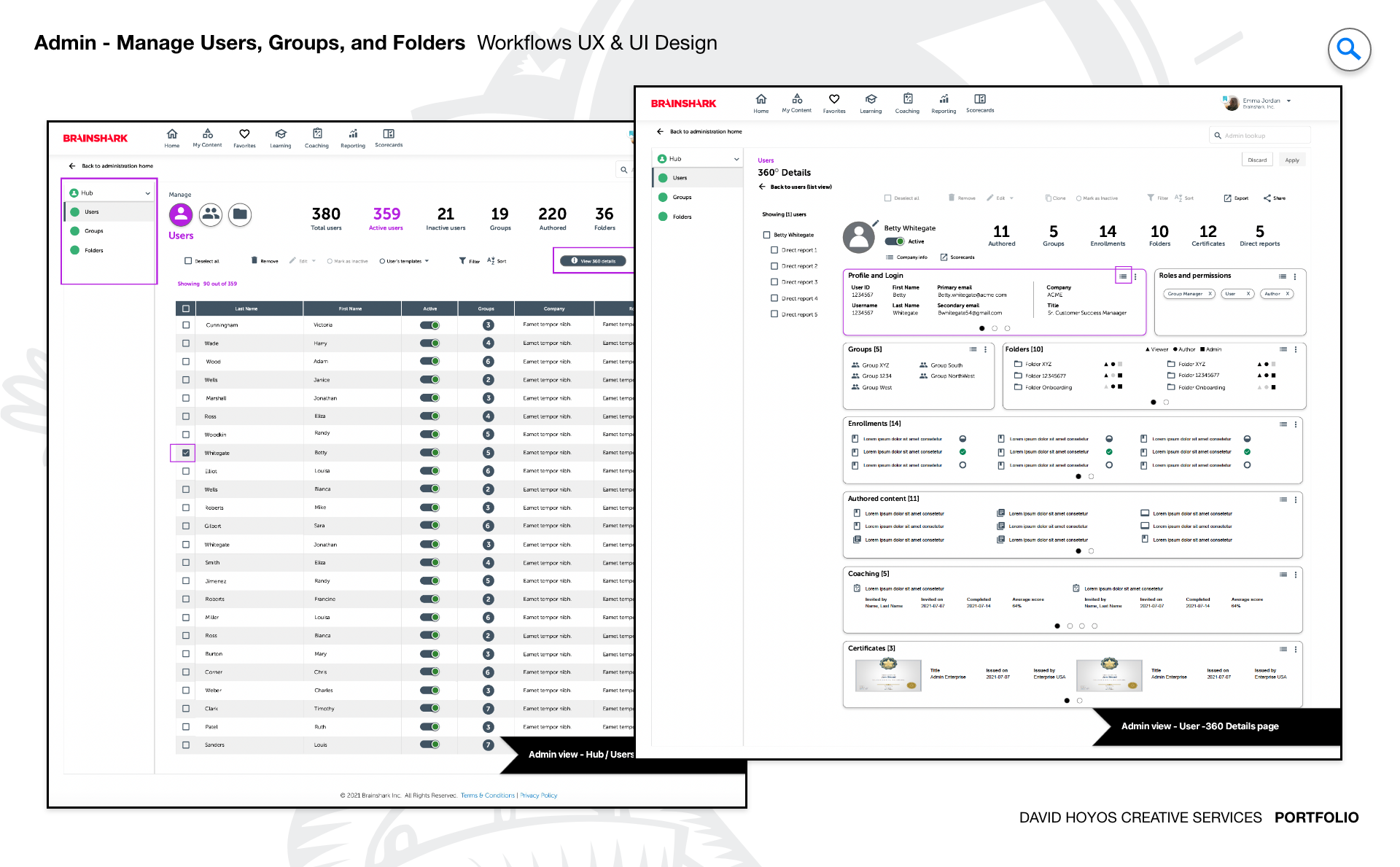
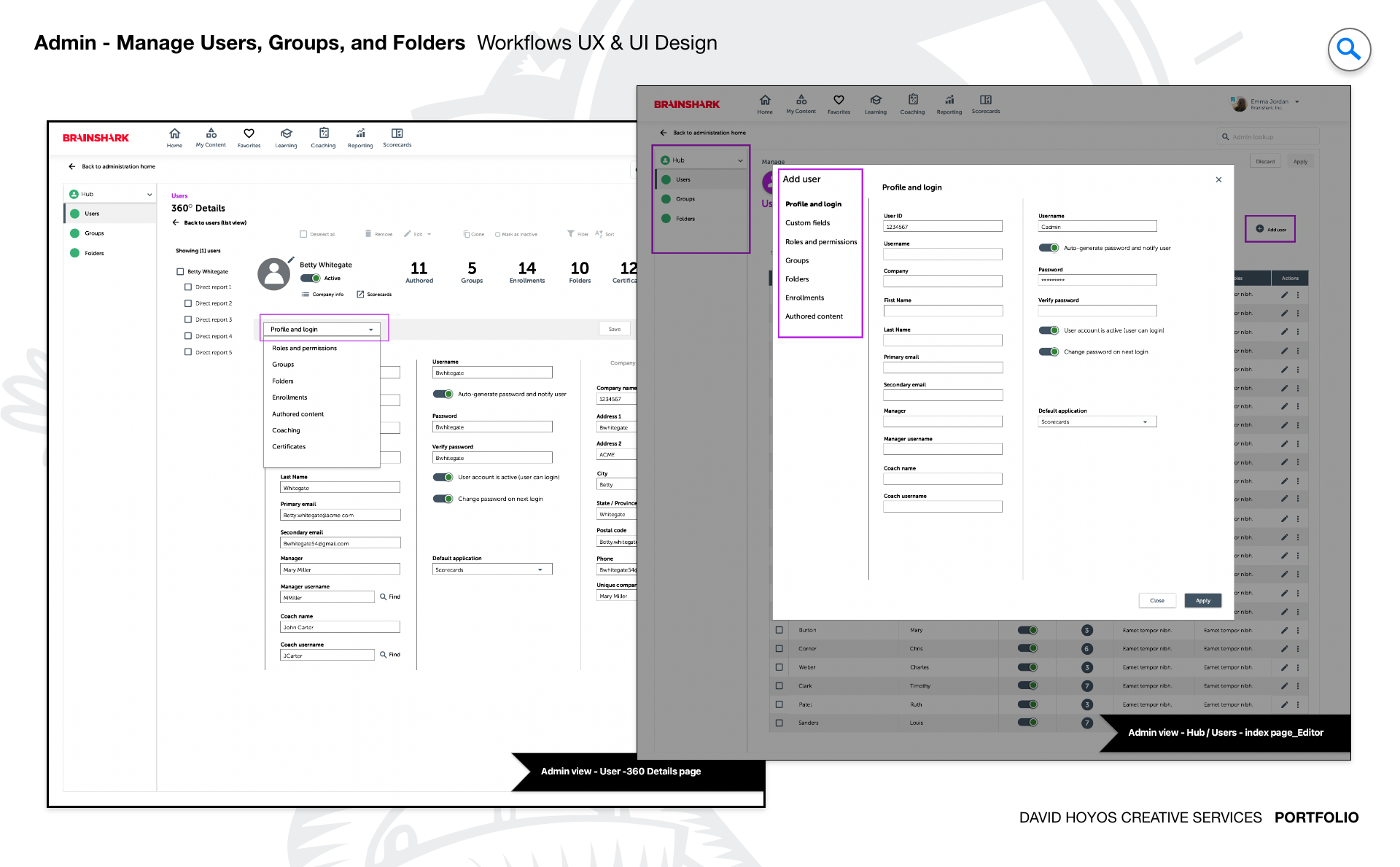
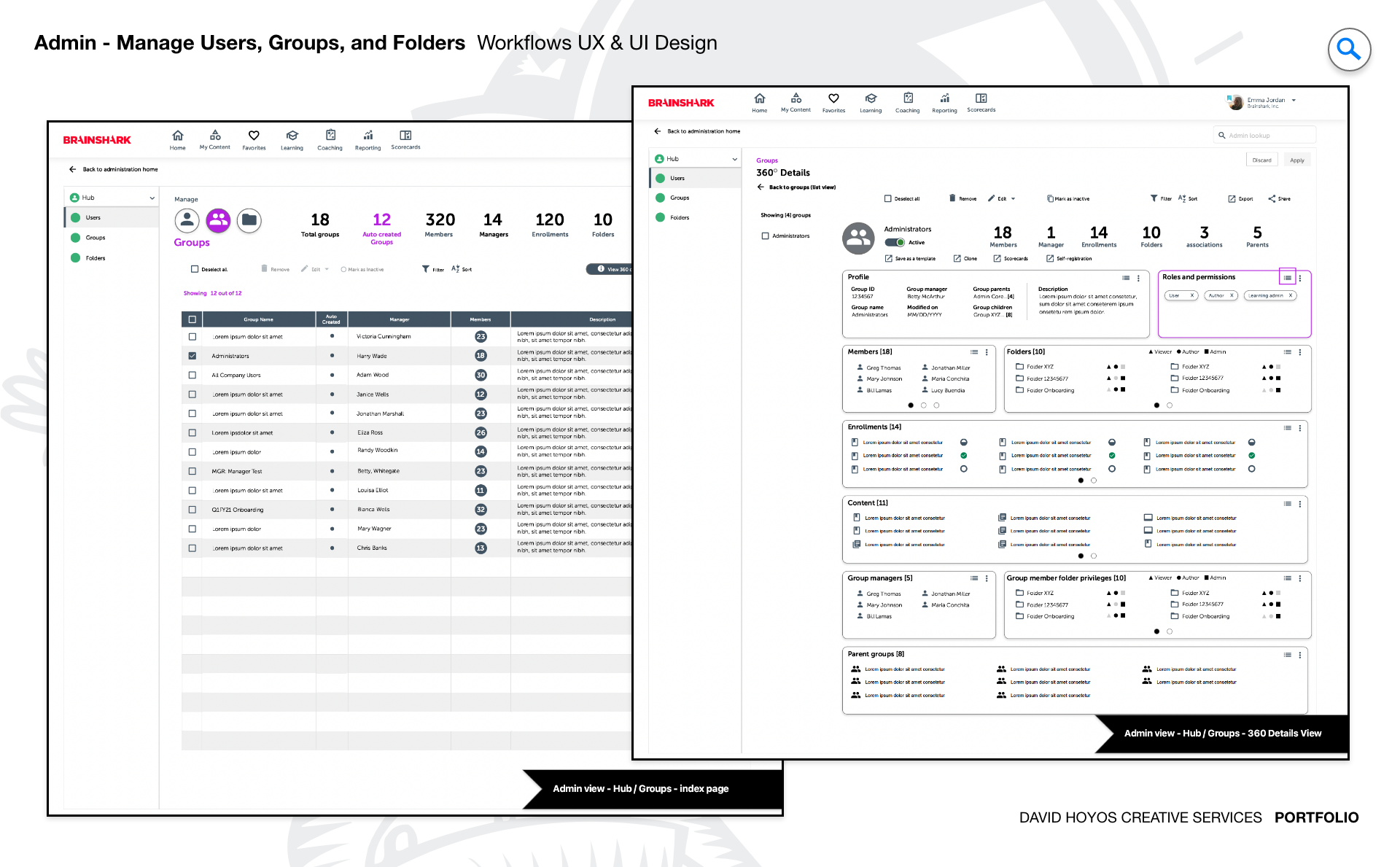
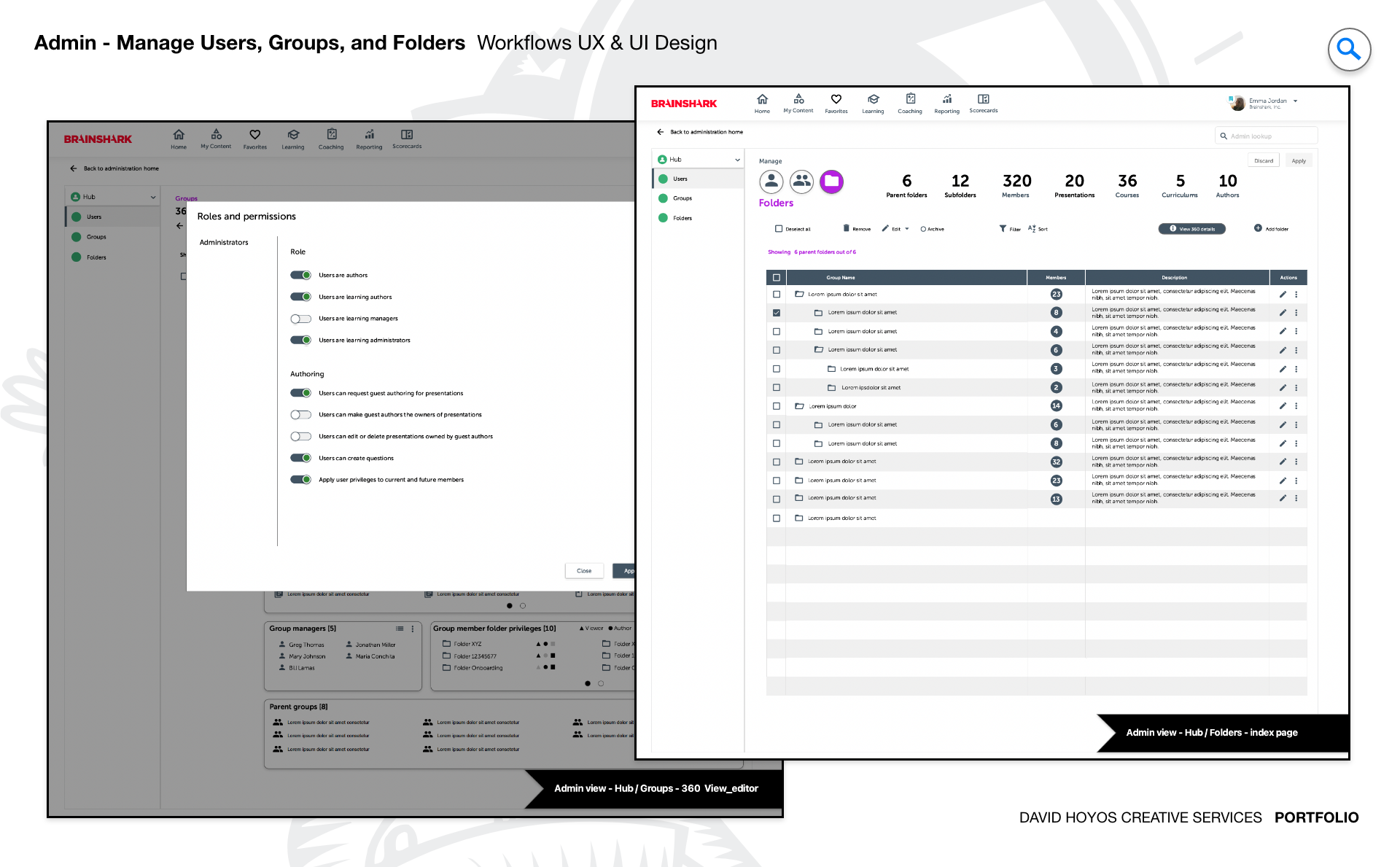
PROJECT Admin workflows to manage Users, Groups, and Folders within BrainShark. The core of any enterprise platform is not what end users see but how administrators keep it running. This project focused on the admin layer of BrainShark, designing the workflows that system admins, customer admins, and learning admins use to manage users, groups, and folders across a complex sales enablement environment. The work was not about building a single screen but about designing the full operational logic that lets admins do their jobs without friction getting in the way of the platform's performance for everyone who depends on it. BrainShark serves organizations across life sciences, retail, manufacturing, and technology, and each of those contexts brings different administrative demands: large user bases with complex permission structures, frequent onboarding and offboarding cycles, and content libraries that grow faster than the organizational models meant to contain them. Designing admin workflows that served all those contexts required understanding not just what admins needed to do but how much of it they needed to do at once. OBJECTIVE The objective was to design a comprehensive sales readiness and enablement application tailored specifically to the needs of administrators, giving them the tools to manage their environments efficiently while ensuring that end users experienced a platform that was consistently well organized and accessible. Admins are the invisible infrastructure of any enterprise software product: when their workflows are well designed, the entire platform runs smoothly, and end users never have to think about it. When their workflows are broken or slow, the consequences ripple outward into every team that depends on the system. The goal went beyond usability. An admin tool that requires a great deal of manual, repetitive effort to maintain a large user base is a tool that creates organizational risk: updates get delayed, permissions drift out of sync, and content lands in the wrong groups because correcting the structure requires too many steps. Designing for efficiency at scale meant designing a system where admins could complete complex, high-volume tasks with confidence and speed, so the platform they were managing stayed in the state that the rest of the organization depended on. CHALLENGE Volume of data, bulk edits and navigation. Volume of data was the central design problem. Enterprise sales enablement platforms accumulate users, groups, and folders at a pace that makes one-at-a-time management unsustainable. An admin overseeing a deployment spanning thousands of users across multiple business units cannot afford a workflow that treats each user record as an individual transaction. The interface had to present large data sets in a form that supported both scanning and targeted action, without requiring admins to scroll through lists that were essentially unmanageable at full scale. Bulk editing introduced a distinct complexity. Allowing admins to act on many records at once is a significant efficiency gain, but it also introduces the risk of consequential mistakes. The design had to balance the speed of bulk operations with the safeguards that prevented an admin from inadvertently restructuring a large portion of the user base in a single misguided action. Confirmation logic, clear scoping of what was selected, and transparent feedback about what had changed all had to be part of the interaction model. Navigation across a deeply structured content hierarchy added the third layer. Users live in groups, groups live in organizational structures, and folders hold the content those groups are assigned to access. Moving through that hierarchy efficiently and understanding where you are within it at any moment required a navigation model that reflected the actual mental model admins used when thinking about their environment, not just the technical structure underlying the data. PERSONA(S) System Admins, Customer Admins, and Learning Admins. Three admin personas, each operating with a different scope of authority and a different day-to-day relationship with the platform. System admins hold the broadest set of permissions and are responsible for the platform at its highest level. They configure the foundational structures including roles, permissions, and organizational hierarchies that all other admins operate within. Their workflows tend to involve complex decisions about access and structure, and they need visibility into the state of the entire system without being buried in operational detail that belongs to a narrower scope. Customer admins manage the platform on behalf of a specific organization or business unit. Their work is more operational: onboarding new users, organizing groups, assigning content, and maintaining the accuracy of the user base as the organization grows and changes. Learning admins occupy a more focused role within the content and training layer of the platform. They are managing who gets access to what learning content and ensuring the right groups are aligned to the right materials, which means their primary navigation context is content and group assignment rather than the underlying user management infrastructure. INDUSTRY Sales Enablement (Life Science, Retail, Manufacturing, Technology, etc.) Sales enablement as a product category sits at the intersection of content management, learning delivery, and performance tracking, and the industries using BrainShark each bring different organizational structures and compliance pressures to that intersection. In life sciences, regulatory training requirements mean that admin workflows have direct compliance implications: a user who is not correctly assigned to the right group may miss a required training, and the record of that miss matters in ways that it does not in other industries. In retail, high turnover creates constant administrative churn, and the workflows had to support the repeated onboarding and offboarding cycles that define how retail organizations maintain their user base. In manufacturing, the platform supports training tied to operational safety and certification, where accuracy in group and content assignment carries real stakes. In technology, organizations tend to be large, fast moving, and structured around product lines or regional divisions that require sophisticated group hierarchies to reflect. Across all of these contexts, the admin workflows had to be robust enough for the most demanding use case and approachable enough for an admin who was not a power user but still needed to get things done efficiently. PROCESS Discovery, Exploration, Design Discovery began with a close study of how admins were actually using the existing platform: where they spent the most time, where they hit friction, and what workarounds they had developed to accomplish tasks the interface did not support cleanly. Admin work generates clear signal about where a product is failing because the problems surface in the form of time: tasks that should take seconds taking minutes, bulk operations that had to be done one record at a time, and navigation paths that required too many steps to reach the information an admin needed to act on. Exploration tested structural approaches to the core workflow challenges: how to present large data sets in a way that supported both scanning and targeted action, how to scope and execute bulk operations with appropriate safeguards, and how to design a navigation model that reflected the hierarchical structure of users, groups, and folders without requiring admins to hold the entire tree in their heads at once. Design translated those explorations into wireframes that specified the interaction logic and layout structure for each admin workflow in enough detail to move directly into visual design. DELIVERABLES Wires The deliverable for this project was a comprehensive set of wireframes covering the full scope of admin workflows: user management, group management, folder management, bulk operations, and the navigation patterns connecting them. At the level of workflow complexity involved here, wireframes are not rough sketches but detailed specifications of interaction logic: what triggers a bulk action mode, how selections are scoped and confirmed, how the hierarchy is navigated, and how the system communicates the result of a completed operation back to the admin who initiated it. The wire set served as both the design specification for the UI phase and the alignment document for the product and engineering teams who needed to understand the intended behavior before implementation. Getting the wireframes to that level of precision required working through the edge cases and exception states that bulk operations inevitably produce: what happens when a partial bulk action fails, how the system surfaces errors at scale, and how admins recover from mistakes without needing to contact support. TEAM UX + UI + PM UX, UI, and Product Management: a lean structure for a complex product area, which placed a premium on alignment between design and product from the beginning of the work. Without an engineering representative in the core team, the design process had more room to define the intended behavior on its own terms before those decisions were stress-tested against implementation constraints. That freedom came with the responsibility of being precise: wireframes that were ambiguous about interaction logic would create problems downstream that a more integrated team structure might have caught earlier. The UX and UI partnership was particularly important here because the admin domain sits at the intersection of information architecture and visual design in ways that make the two disciplines difficult to separate. The way data is organized in a table, the way selection states are visually distinguished, and the way a bulk action confirmation is presented are all simultaneously structural and visual decisions. Working with UI closely throughout the wire phase rather than handing off at the end of it produced a more coherent result across both the logic and the look of the workflows. ROLE Design leadership and execution. The role combined design leadership with hands on execution across the full workflow scope. At the leadership level, that meant setting the design direction for how the admin experience should feel at its best: not as a utilitarian backroom tool that users merely tolerated, but as a capable, professional environment that respected the complexity of the work admins were doing and gave them an interface that matched that complexity with clarity rather than adding to it. At the execution level, the role meant designing every workflow in the wire set, making the individual decisions about how each interaction should behave, and iterating on those decisions in response to feedback from product, stakeholders, and usability testing. Admin workflows are among the most consequential UX surfaces in an enterprise product because the people using them are the ones keeping the platform functioning for everyone else. Getting that layer right required the same care and precision that goes into the end user experience, applied to a context where the stakes of a wrong decision operate at a much larger scale.